Start with the TikTok preset instead of guessing which region to use. You can keep the optimized choice or switch regions yourself when you want to compare another route.
Open TikTok help when you need it ↗Service guide / Social
TikTok VPN guideScroll, share and call on a private route.
Choose the TikTok preset when you want a connection shaped around scrolling, sharing and making calls. FREE VPN US makes the route easy to start and easy to change.
Guide typeService presetDesigned aroundiPhoneCategorySocialEditorial review8 Sep 2026
01
Why this preset helps
Why use FREE VPN US with TikTok?
The TikTok preset helps FREE VPN US choose an optimized connection for the service automatically. Connect first, then open TikTok with the account you already use—especially useful when you are on hotel, airport or café Wi-Fi.
TikTok, selected in one tap
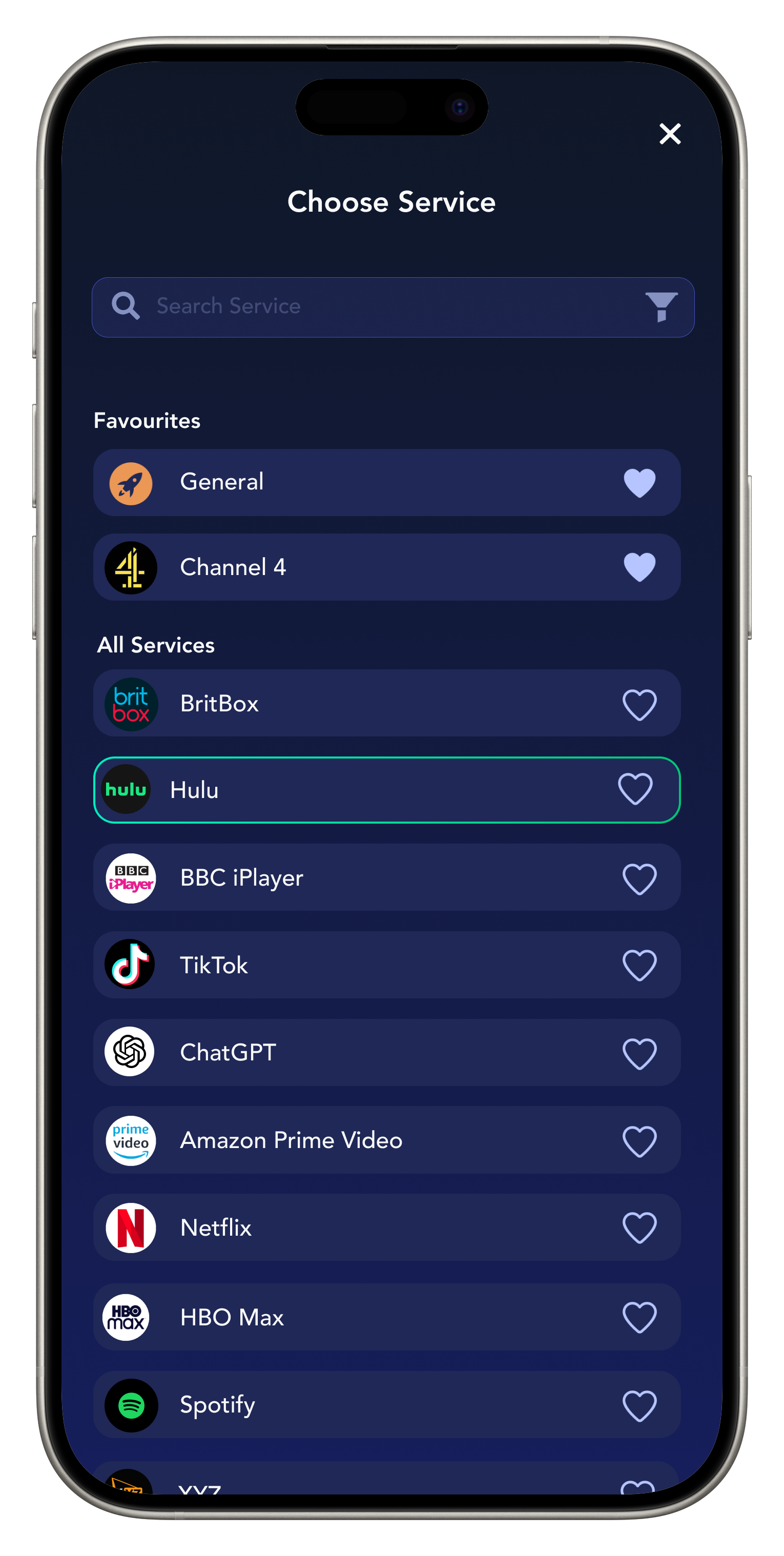
Open Services, choose TikTok, and let FREE VPN US prepare a service-focused connection without making you guess the first region.
Privacy for the network you are on
Encrypt traffic between your iPhone and the VPN connection before scrolling, sharing and making calls on shared Wi-Fi.
Automatic first, flexible when needed
Use the optimized server chosen for the service, or open Regions and compare another available route yourself.
02
How the connection works
From your iPhone.
Through one private route.
Choose TikTok and FREE VPN US prepares an optimized service connection. Your traffic travels through the encrypted VPN route before it reaches the app or website.
 Your iPhoneTap connect
 FREE VPN USEncrypted VPN route
 TikTokOptimized service choice
A simple view of the connection path from your iPhone through FREE VPN US.
03
In the app
Real FREE VPN US interface.
Available entries can change.
From Services
to TikTok.
- 01
Get FREE VPN US on iPhone
Install the app, open it and approve the standard Apple VPN configuration when prompted.
- 02
Select TikTok in Services
Open Services and choose TikTok. FREE VPN US will prepare an optimized server choice for that service, and you can still update the region if you prefer.
- 03
Connect and open TikTok
Tap connect, wait for the connected status, then open TikTok and continue with your usual account.
04
Why FREE VPN US
A smarter start for TikTok.
What FREE VPN US brings
- An optimized VPN route selected around TikTok.
- Encrypted traffic between your iPhone and the VPN endpoint.
- A quick service-first setup with manual region control still available.
You stay in control
- A VPN does not hide activity from the account you sign into or override local rules and app-store availability.
- Your account identity, purchases and provider history.
- The provider’s current plan, device and eligibility rules.
Everyday ways to use it
TikTok without the setup maze.
These are representative use cases written by our editorial team, not attributed customer reviews.
See ratings and reviews on the App Store →“I select TikTok, connect, and then open the app I actually want to use. It removes the guesswork from choosing a route.”
One-tap service setup
Illustrative user scenario“Before using TikTok at a hotel or café, I turn on VPN US so the connection is protected first.”
Social on shared Wi-Fi
Illustrative user scenario“The optimized service choice is convenient, and I can still change the region when a different route works better for me.”
Control when I need it
Illustrative user scenario05
Quick help when you need it
Keep the good route.
Fix the small friction.
Most TikTok sessions begin with three actions: select the service, connect and open the app. If something interrupts that flow, these focused checks get you moving again.
TikTok does not load
Reconnect once, reopen TikTok, and try a simple action. If other sites work normally, use this focused check: Compare loading the feed with uploading a short clip. Check account notices and app updates before changing the connection; an account restriction needs TikTok support.
Playback, calls or downloads feel slow
Pause other large downloads and compare one other available region. Keep the better route connected for the session.
The service shows an account message
Keep the VPN connected if appropriate, then check the service account itself. A VPN does not hide activity from the account you sign into or override local rules and app-store availability.
Want a hand? Share the app version, selected label and exact error in our anonymous contact form.
Contact support →06
Quick answers before you connect
TikTok.
The details that matter.
Everything you need to choose the preset or region with confidence.
How do I use the TikTok preset?
Open Services in FREE VPN US, choose TikTok, connect, and then open the TikTok app. The service choice helps the VPN select an optimized server automatically.
Can I change the region after choosing TikTok?
Yes. The optimized service route is the easiest place to start, but you can open Regions and select another available location whenever you want to compare it.
Why use a VPN with TikTok on public Wi-Fi?
The VPN encrypts traffic between your iPhone and the VPN endpoint, adding protection when you use shared hotel, airport or café networks.
Do I still need my own TikTok account?
A VPN does not hide activity from the account you sign into or override local rules and app-store availability.

Snapchat
Choose the Snapchat preset to scroll, share and call through a private, service-focused connection on iPhone.
Social↗
CapCut
Choose the CapCut preset to scroll, share and call through a private, service-focused connection on iPhone.
Social↗
X
Choose the X preset to scroll, share and call through a private, service-focused connection on iPhone.
Social↗A question, request or connection issue?
Use the Help Guide or send an anonymous support message.
FREE VPN US is independent of the services named. Brand marks identify a guide and do not imply endorsement, guaranteed compatibility or current availability.